

Creating Your Own Custom Chatbot
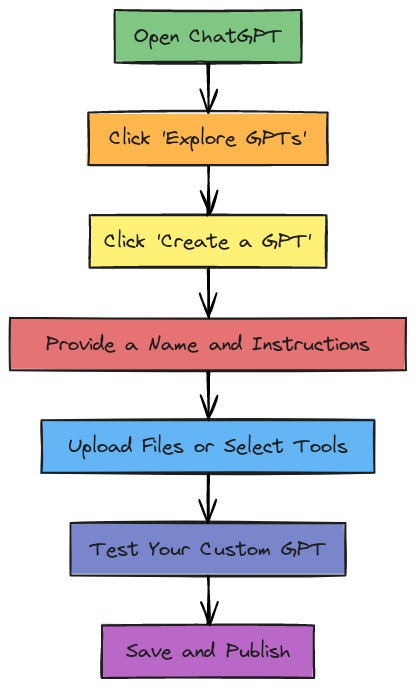
OpenAI allows ChatGPT Plus and Enterprise users to create custom chatbots using a feature called Custom GPTs. This can be useful in safety programs in a variety of ways including 24/7 access to safety information, on-demand microlearning, new employee orientation, and behavioral safety coaching, just to name a few.
Here's how to do it:
1. Go to ChatGPT
Visit [chat.openai.com](https://chat.openai.com) and log into your Plus account.
2. Click “Explore GPTs”
On the left-hand sidebar, click “Explore GPTs”.
Then click “Create a GPT” (top right corner).
3. Use the GPT Builder
You’ll be guided through a no-code setup wizard that asks:
What should your GPT do?
Should it have a specific tone, personality, or role (e.g., tutor, supervisor, friend, customer support)?
Should it access tools like web browsing, image generation, or APIs?
You can also upload files (PDFs, DOCX, text) for your GPT to reference. This is where I think there is great value when implementing one in your programs. Just be very careful not to upload documents that you would not want out in the public domain.
Add custom instructions to guide behavior and responses.
4. Test and Publish
You can test how it performs and make changes as needed.
Choose whether to keep it private, link-only, or publish it to the GPT Store. If you are using it internally, you want to keep it private.

I have created two custom chatbots for safety training. One is public, Your Safety Training Friend, and can be found here. The other is a private chatbot for VIP Subscribers of The Safety Training Net and is based on the contents of several of my books. If you are not yet a VIP subscriber, consider subscribing today! Details can be found at: https://safetytraining.substack.com/
Leave a comment
Comments will be approved before showing up.
Also in SafetyFUNdamentals Blog

Best Practices for International Safety Days
Creating training materials for an international audience involves more than just translation. Consider these 10 points before you send your activities around the world.


EHS Curated Podcasts Update for July 2026
This update covers everything from lithium-ion battery risk, OSHA litigation, heat stress economics, proactive safety culture, and what it takes to run a company for 100 years in a high-hazard industry.